Could you hand a judge your staff's AI chat history?
In 2026, courts in Alabama and Texas ordered AI chat histories produced. New Jersey's Supreme Court now urges every firm to adopt an AI policy and supervise how staff use AI (Notice to the Bar, Mar. 30, 2026).
Free to start: fee and code lookups and sample cases. No card needed.
The AIClaude, from AnthropicA leading model. We keep it current so you do not have to.
AgreementBAA on requestFree, and signed the same business day if your firm needs one.
PrivacyNot used to train AIAmazon does not keep your questions or the answers.
Why a firm tool
Staff already use AI. Give them a version you can defend.
When people paste client records into personal chat apps, the firm has no record of what went in. Case AI gives each case one private place, and keeps the record for you.
A personal chat app compared with Case AI
A personal chat app Not secure
Case AI Secure
Chats sit in each person's own account.
One private workspace per case. Files, chats and facts together.
Nothing shows which files went in, or when.
An AI use report for every case. Each file, who added it, and when.
No privacy contract covers the records pasted in.
Privacy terms in writing. Confidentiality and no AI training for every firm, plus a BAA if you ask.
Everyone figures it out alone.
Your team learns together. One training day, on a real case.
The One-Day AI Training for Small Law Firms
Bring one real case. We handle setup and train the whole team in a day.
You can look around alone, today, for free, with the fee and code lookups and sample cases. When you want hands-on help, we set up, train and check your security. All three come with every paid plan.
I
Training day for the team
A full day with your whole team on your own first case, then a follow-up call a week later. In person in New Jersey, or live by video anywhere else.
II
Security check for the firm
We go through Dropbox, Gmail and your devices, fix what we can, and show you what is left.
III
AI paperwork, done
A setup letter, a firm AI policy and a protective-order clause, ready to use.
The team behind Case AI has worked in the legal industry for more than 10 years, and already runs AI systems for law firms.
What it does
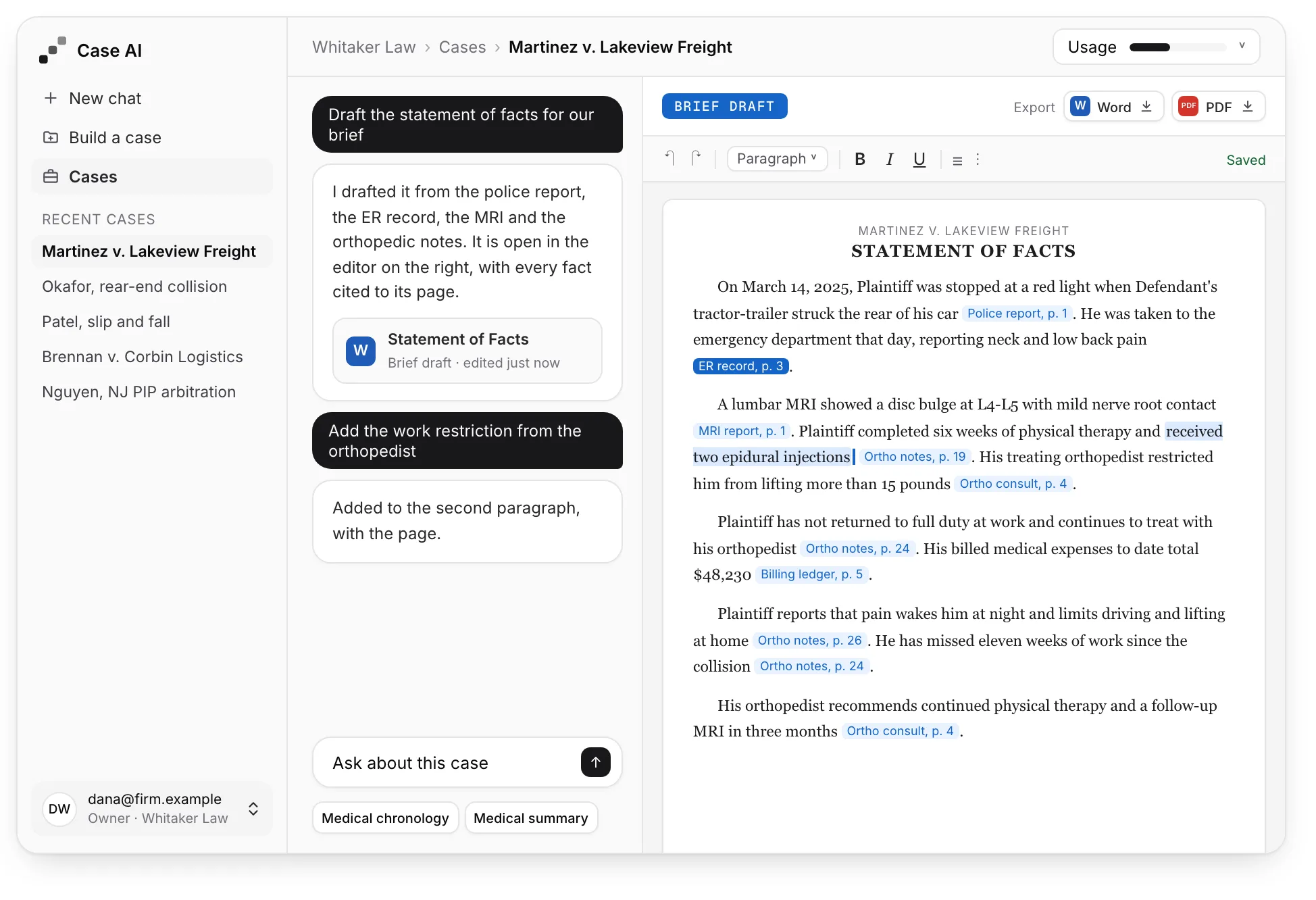
Add the file once. Get back a cited brief and a medical chronology.
Every case keeps its files, chats and facts together, so nobody starts over.
A workspace for each case
Upload once, then draft, edit and export.
Add records, bills and depositions. Ask for a brief and it opens in an editor next to the chat.
Edit, then export. Word or PDF.
Scans work too. Nothing to retype.
Pick up later. Your files stay in place.
Exhibit AA brief drafted from the case file, each fact cited to its page.
Ready-made tasks
Ask your own question, or run a ready-made task.
Type a question in plain words, or choose one of five tasks:
Brief draft. Facts cited to pages.
Medical chronology. Every visit, in date order.
Medical summary. In plain language.
Billing summary. Charges and totals.
Treatment gaps. And prior injuries.
Exhibit BA medical chronology in date order, each row cited to a page.
AI use report
When a court asks about your AI use, press one button.
You get a PDF listing every uploaded file, who added it and when, with a signature line for the attorney.
Ready when asked. The attorney signs it.
Plain words. It explains how the AI is set up.
Files only. Your questions are not listed.
Exhibit CThe AI use report: each file, who added it, and when.
Can you rely on it?
Each answer points to a page. Your team checks the record and decides.
Click a citation, see the page
The cited page opens right away. You verify against the record itself.
The judgment stays with you
Case AI writes a first draft. Your name goes on what you file, and every decision is yours.
More work out the door
The AI does the first pass. Your staff reviews it and carries a bigger caseload.
Privacy and security
Client files stay private, and the terms are in writing.
Case AI runs in Amazon's cloud (AWS). Each AI use report describes the setup in plain words, for a court or a client.
BAA if you need one
Free and signed the same day. Our terms already hold us to the same safeguards for every firm, and AWS has its own BAA with us.
No AI training on your data
Amazon does not keep or train on your questions or the AI's answers.
Deleted within a year
Files and chats are removed a year after upload, or 90 days after your plan ends. Download what you need first.
Logs without case details
Our system logs never record file names, questions or record text.
Start free. Keep a paid plan only if it earns its place.
No card. Try the fee and code lookups and the sample cases. If you then pay $300 a month and it is not for you, email support@s2reason.com within 30 days and we refund that month in full. We carry the risk.
Look up what Medicare pays for any code in every state, and what it pays a hospital for a stay. Look up New Jersey PIP fees. Look up what a diagnosis code means, and the fee for a supply or drug code. Try the sample cases with saved answers. Using the AI on your own files starts on a paid plan.
Each month you can read 40,000 pages, ask 400 questions and finish 40 tasks. Or sort 40,000 medical record pages by date, at 1.1 cents1.5 cents a page.
Each month you can read 100,000 pages, ask 1,000 questions and finish 100 tasks. Or sort 100,000 medical record pages by date, at 0.8 cents0.9 cents a page.
Usage amounts are estimates. A task is a finished piece of work, such as a brief, a medical chronology or a summary. The app shows how much you have used.
Priced per firm, not per seat
Many legal AI tools bill by the seat. We assume a typical one costs $300 per seat per month. That is our estimate, not a quote from any company.
5 seatsCost per month
$1,500Typical per-seat tool
$450$600Case AI Small firm$1,050$900
You save$1,050$900a month
10 seatsCost per month
$3,000Typical per-seat tool
$450$600Case AI Small firm$2,550$2,400
You save$2,550$2,400a month
Case AI prices are per month, billed yearly.Case AI prices are month to month. Reported prices for the main legal research tools run from about $250 to $500 per seat, and far more for some others (October 2026).
Questions
Answers to what lawyers ask first.
Safety and privacy
Are we allowed to use AI in our practice?
Yes, with care. The N.J. Supreme Court's 2024 guidelines say your ethics duties are the same with AI as without it. You check what the AI produces, confirm a system is secure before client information goes in, and supervise your staff's use. Case AI helps with each: written confidentiality terms (and a BAA if you ask), a cited page behind every fact, and a record of what was uploaded. You remain responsible for what you file.
Can you sign a BAA with us?
Yes. Ask, and we sign one for free the same business day. A BAA (Business Associate Agreement) is a contract in which we promise to protect the medical records you upload. Most firms that represent injured people are not covered by HIPAA and do not need one, and our Terms of Service hold us to the same safeguards for every firm. Case AI runs only on Amazon Bedrock and other AWS services, which AWS covers with its own standard BAA.
Will the AI learn from our files?
No. AWS states that Amazon Bedrock does not use your questions or the AI's answers to train models, and does not share them with the model's maker (Bedrock FAQ). Our AWS account is set so AWS stores none of them (AWS data retention page). Case AI uses Claude, made by Anthropic. We pick and update the model, so your team never has to.
Where are our files and chats kept?
In S2Reason's own AWS account. Pages with no text layer, such as scans, are read by Amazon Textract in that same account, which keeps the result of each page-reading job, encrypted, for up to 7 days. Chats stay with the case so your team can continue where it stopped. Your firm can delete them at any time. Anything not deleted is removed automatically one year after it was created, or 90 days after your plan ends. The AI use report lists files only, never your chats.
What if the AI makes a mistake?
It can. That is why every answer cites its pages, and each citation opens the page. Treat the output as a first draft, the way you would check a new paralegal's work. Every decision is yours.
Price and terms
Is Case AI a fit for our firm?
The One-Day AI Training for Small Law Firms is built for small firms in any state, mostly personal injury. New Jersey firms also get built-in New Jersey law libraries and a PIP arbitration brief. Nobody has to be technical. Start on your own with the free lookups and sample cases. When you want help, we train your whole team free of charge, in person in New Jersey or live by video anywhere else: a full day on a real case, then a follow-up call a week later.
What do I get for free?
Fee and code lookups (Medicare, New Jersey PIP fees for New Jersey users, ICD-10 and HCPCS) and the two sample cases with saved answers. No card, one person. Using the AI on your own files starts on a paid plan.
How large can a file be?
Up to 1 GB.
Is there a contract? Can I get a refund?
There is no contract, and Free needs no card. Every paid plan includes your one-time onboarding and every Case AI feature. If your first paid month is not for you, email support@s2reason.com within 30 days and we refund that month in full, no questions asked. If you cancel a yearly plan, you get back the months you did not use, at your yearly price.
What happens when we use up the month?
The app shows your usage as a percent of the month, with the date it resets. At 100%, work pauses until the reset on your plan's monthly date. To get more sooner, move up a plan: it starts that day, and you pay its price minus a credit for the unused days of your current plan. Mid-size firms can write to support@s2reason.com.
Try it free, then run one real case through it.
Sign up with your email. No card. When you want help, we set up your workspace, check your tools and train the whole team for a full day, in person in New Jersey or live by video anywhere else, with a follow-up call a week later.
Start freeKeep it for $300 a month, or don't.Prefer to talk first? Email us.